A GUIDE FOR TEAM APPAREL MAKERS
Bulk rhinestone name templates, without shrinking the holes.
You have a cheer or dance roster and need a separate stencil for each name. The names differ in length, but the stones still need the same size holes. Start with a successful calibration cut, then lay out each name at that fixed hole diameter.
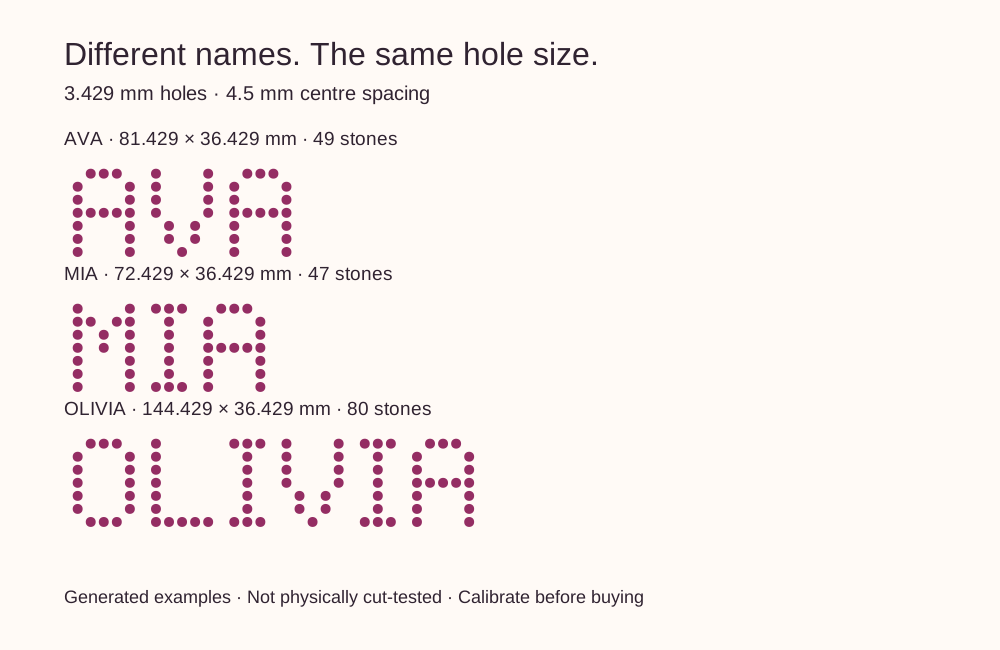
Why a longer name needs more space
If you scale an entire SVG to make a longer name fit, you also scale every hole. A template with 3.429 mm holes scaled to 80% has 2.7432 mm holes. A calibration cut at the original size does not validate those smaller holes.
Teamstone keeps the hole diameter and centre spacing fixed. Choose a 6, 8 or 10 inch maximum stencil width, including the cutting frame. The preview rejects a name that does not fit. Selecting a wider maximum permits a longer name; it does not stretch short names to fill that width.
Prepare your roster
- Confirm the spelling and usable area on each garment before generating files. Use only names you have permission to provide.
- Enter one name per line, up to ten. Our single uppercase block-dot style accepts A–Z and single spaces, hyphens or apostrophes between letters. It does not support script lettering, accents or custom logos.
- Preview every name. Check the displayed width and height against your usable area, including the outer cutting frame. If a name is too wide, select a larger supported width or use an agreed shorter name.
- Keep the hole diameter that passed calibration. Import the purchased SVG at the exact dimensions shown in its size sheet.
Test your stones and stencil material for free
The calibration strip is 100 × 40 mm with 30 holes. Try the 3.100, 3.300 or 3.429 mm option with your actual stones and material. The names and strips use 4.5 mm centre spacing. These options are intended for nominal SS10 stones; the label alone does not establish a successful fit.
Download free calibration SVGs
Check the imported rectangle dimensions, make a test cut, measure the cut frame and try brushing in and releasing the stones. Only buy with a size that works for your setup. We have not physically tested these files on a cutter.
Import at the file's original dimensions
Use an SVG-capable application and check the dimensions after import. For the supported workflow references and measured sample conventions, follow our calibration and import guide. It links to the machine makers' documentation. Do not assume that a preview on this page proves compatibility with your machine or software edition.
What the batch includes
The offer is $29, plus applicable tax, for up to ten names: one SVG per name, a size and stone-count CSV, and instructions in one ZIP. These are digital stencil files. No shirts, transfers, stones or equipment are included. You can use the designs on physical items you sell; redistribution of the digital files is excluded.
Request a full refund within 14 days for any reason, without proof. If a file does not cut correctly, contact us even after that window. Provider processing time applies. See the refund policy.
Paid checkout is being prepared. Previewing and calibration downloads are available without payment.